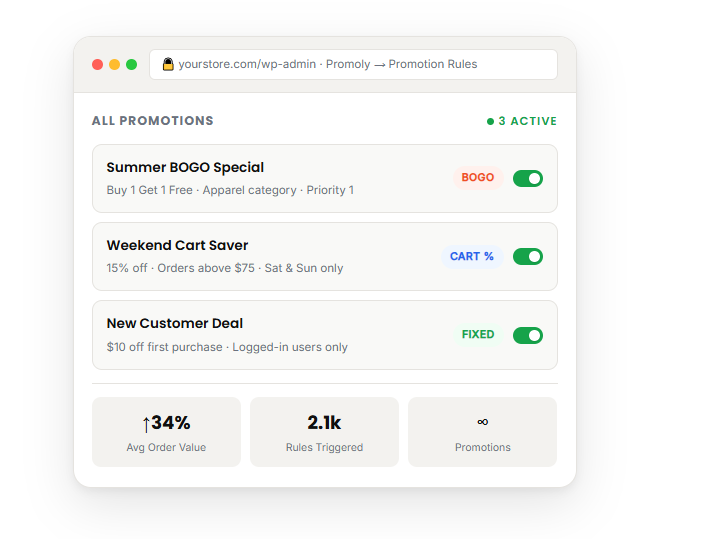
Promotions That Actually Work
Every Tool to Run Smarter
Promotions
gives you surgical control over every promotion in your store.

BOGO Offers
Create Buy X Get Y promotions with flexible product and category conditions. Supports variable products and all variation types.

Cart Discounts
Aamount or percentage discounts to the cart total. Set minimum subtotal thresholds for targeted promotions.

Smart Conditions
Trigger rules based on products in cart, user roles, cart quantity, scheduled dates, and sale item exclusions.

Scheduled Promotions
Ed dates for every promotion. Run time-limited campaigns automatically — no manual toggling required.

Variable Product Support
Full support for WooCommerce variable products and variations in both conditions and rewards — free and premium.

Limit & Abuse Controls
Cap total uses, set per-user limits, require login, and target specific user roles. Full control over promotion reach.
Free vs Premium
Start Free. Upgrade When
You're Ready.
Premium unlocks advanced targeting, automation, and support.
Free Plan
Free Forever
- Basic BOGO promotions (Buy X Get Y)
- Fixed amount cart discounts
- Percentage cart discounts
- Product in cart conditions
- Product reward actions
- Scheduled promotions (date range)
- WooCommerce HPOS compatible
- Priority management
- Unlimited promotion rules
- Cart subtotal conditions
Premium Plan
Upgrade
- Everything in Free
- Category & variation in cart conditions
- Any product (min qty) conditions
- Total cart quantity rules
- Give specific variations & categories
- Give cheapest item automatically
- Day-of-week schedule restrictions
- Exclude sale items from promotions
- User role targeting
- Per-user & total usage limits
- Require logged-in users
- Priority support
How Promoly Works
From install to live promotion in under 5 minutes. No shortcodes, no
templates, no developer required.
1. Install & Activate
Search "Promoly" in the WordPress plugin directory. Install and activate with one click. No
setup wizard required.
2. Create a Rule
Go to Promoly → Promotion Rules. Click "Add New", name your promotion, and select the type — BOGO or discount.
3. Set Conditions
Define when the rule fires — products in cart, subtotal threshold, user role, date range, or cart quantity.
4. Publish & Go Live
Hit Publish. Promoly applies automatically at checkout. Track results and adjust conditions at any time.
System Requirements
hosting environments.
6.0 or higher
8.0 or higher
7.4 or higher
5.6+ / 10.0+
Simple, Honest Pricing
All plans include every Premium feature. Choose the license that
fits the number of sites you manage.
3.25 /mo
- All Premium features
- Advanced BOGO & conditions
- User role targeting
- Usage limits & restrictions
- Give cheapest item free
- Priority email support
6.58 /mo
- All Premium features
- Advanced BOGO & conditions
- User role targeting
- Usage limits & restrictions
- Give cheapest item free
- Priority email support
11.58 /mo
Billed annually · Unlimited Sites site
- All Premium features
- Advanced BOGO & conditions
- User role targeting
- Usage limits & restrictions
- Give cheapest item free
- Priority email support
Frequently Asked Questions
WooCommerce store.
Does this work with my theme?
Can I run multiple promotions at once?
Is it compatible with WooCommerce HPOS?
Does it work with variable products?
How many promotions can I create?
Will it slow down my store?
Ready to Grow Your Store?
Promoly
Install Promoly free and launch your first promotion in
minutes. No account needed. No credit card.